Smartphones have transformed the way we interact with the world, but behind their sleek interfaces lies a history of small yet powerful tools known as widgets. At first glance, widgets might seem like simple add-ons—little squares or circles displaying a clock, weather forecast, or calendar reminder. Yet their evolution tells a story not just of technological advancement but of how humans have sought to make digital tools feel more immediate, personal, and intelligent. From humble beginnings as static clocks to dynamic, AI-powered assistants, widgets have quietly shaped the way we manage our lives on mobile devices.
The Birth of the Widget: Simplicity at a Glance
In the earliest days of mobile phones, widgets were almost non-existent. Phones were primarily communication devices, limited to calls, text messaging, and rudimentary calendars. The concept of a widget—an on-screen tool providing information at a glance—first began to emerge with the rise of feature phones in the early 2000s. Nokia, with its iconic Series 40 and Series 60 operating systems, introduced simple tools like analog and digital clocks, basic calendars, and calculators. These were static, functional, and primarily designed to give users immediate access to critical information without navigating through menus.
Even in their simplicity, these early widgets set a precedent. They demonstrated a desire for efficiency and convenience, a way to reduce the friction between the user and the information they needed most. In essence, widgets were the first step in transforming the phone from a mere communication device into a personal assistant that anticipates your needs.
The Rise of the Smartphone: iOS and Android Enter the Scene
The true explosion of widgets began with the launch of the modern smartphone era. Apple’s iPhone in 2007 and the first wave of Android devices brought touchscreens, app stores, and a level of interactivity previously unimaginable. Initially, iOS approached widgets cautiously, favoring a minimalist design philosophy. Early iPhones didn’t allow for home screen widgets beyond native apps like Calendar, Stocks, and Weather. Android, on the other hand, embraced the idea more openly. Widgets became a defining feature of Android home screens, offering users clocks, music controls, weather updates, and social media previews that could be positioned freely.
This period marked the transition from static tools to interactive, dynamic widgets. A weather widget, for example, could now update in real time, displaying not just current conditions but forecasts and severe weather alerts. Music widgets allowed users to play, pause, or skip tracks without opening the app. Even social media apps began experimenting with widgets that displayed notifications or previews, letting users stay informed at a glance. The phone home screen transformed from a static launcher of apps into a personalized dashboard reflecting the user’s priorities.
Customization and Personal Expression
As widgets became more prevalent, they also became a canvas for personal expression. Android’s flexibility allowed users to resize widgets, stack them, and choose from thousands of third-party options. Some people created minimalist setups with a single clock and weather widget, while others built elaborate grids showcasing calendars, news feeds, and task lists. Widgets became a reflection of personality and lifestyle. They were not just functional; they were expressive.
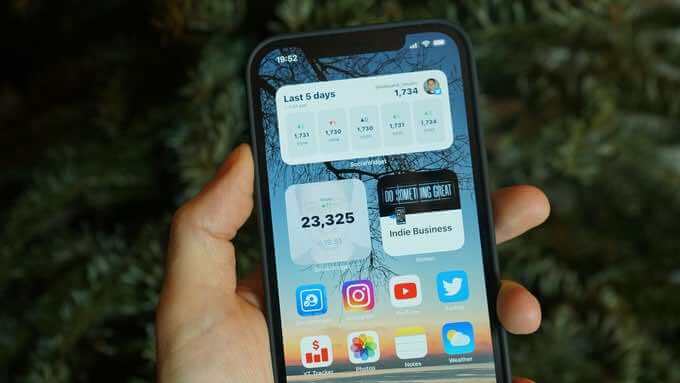
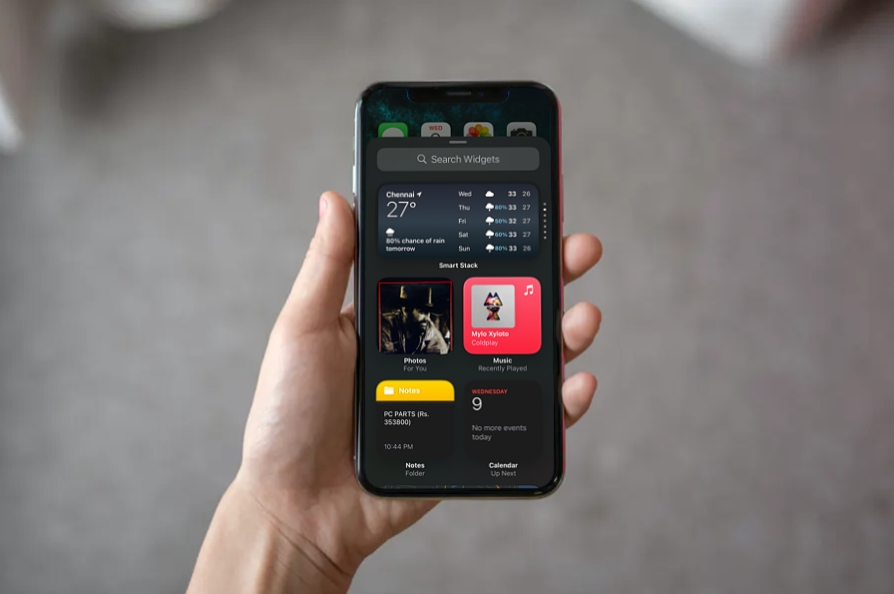
Apple eventually caught up. iOS 14, released in 2020, introduced the ability to add widgets directly to the home screen, marking a significant shift in design philosophy. Widgets could now be placed alongside app icons, resized, and arranged according to user preference. Apple even introduced Smart Stacks, a dynamic collection of widgets that change based on time of day or user activity. This innovation blurred the line between function and intelligence, hinting at the next stage in the evolution: predictive, context-aware tools.
From Passive Tools to Active Assistants
The transition from passive widgets to active assistants is perhaps the most fascinating chapter in their evolution. While early widgets simply displayed information, modern iterations can interact with users, anticipate needs, and even automate tasks. Google’s “At a Glance” widget and Apple’s Siri Suggestions are prime examples. These widgets don’t just tell you the weather or the time; they analyze your habits, remind you of appointments, suggest routes for your commute, and surface news relevant to your interests.
The integration of AI has transformed widgets into extensions of personal intelligence. Fitness widgets now track your steps and heart rate while suggesting adjustments to your activity goals. Finance widgets monitor spending patterns and provide real-time alerts for unusual transactions. Smart home widgets allow users to control lights, thermostats, and security cameras directly from their home screens. The widget is no longer a static shortcut—it has become a dynamic, interactive portal into your digital life.
Widgets and the Culture of Convenience
The rise of widgets also reflects a broader cultural shift: the modern demand for convenience and immediacy. In today’s fast-paced world, users expect information and control at their fingertips. Widgets satisfy this craving by minimizing the number of taps required to accomplish a task or gather information. Checking the weather, responding to messages, or monitoring a stock portfolio can now happen without fully opening an app. This instant-access philosophy has not only influenced smartphone design but also consumer expectations across technology. People now expect digital interfaces to be intuitive, predictive, and efficient.
Moreover, widgets have tapped into the human love for personalization. Users curate their screens to reflect personal priorities, whether that’s health, productivity, entertainment, or news. Widgets create a sense of ownership over digital space, allowing each phone to feel uniquely attuned to its owner. This personalization trend aligns with broader movements in technology where user-centric design and adaptive interfaces are the standard.
The Role of Third-Party Developers
Third-party developers have played an enormous role in expanding the functionality and creativity of widgets. Independent apps have introduced features that native apps often overlooked, ranging from sophisticated task managers to visually stunning photo galleries. Developers have also experimented with miniaturized games, habit trackers, and countdown timers, pushing the boundaries of what a widget can be.
This diversity of options has fueled innovation, creating an ecosystem where users can mix and match widgets to suit their lifestyle. It has also challenged operating systems to become more versatile, responsive, and secure, ensuring that the proliferation of widgets does not compromise performance or privacy.
![a-woman-holding-her-phone-with-widgets-highlighted.jpg [avif-to-jpg output image]](https://s3.ezgif.com/tmp/ezgif-36f0db752d39ee2b.jpg)
The Future of Widgets: AI, Automation, and Beyond
Looking ahead, the trajectory of widgets seems inexorably linked to artificial intelligence and automation. Widgets will likely become more context-aware, capable of predicting user needs with astonishing accuracy. Imagine a widget that adjusts your home lighting, suggests a coffee shop on your route, reminds you to drink water, and queues up your favorite playlist—all without prompting. The line between a widget and a personal digital assistant will continue to blur.
Moreover, the integration of augmented reality and wearable devices could redefine widgets entirely. Widgets may no longer be confined to a phone screen; they could project onto smart glasses, watches, or even car dashboards. The evolution will continue to prioritize immediacy, personalization, and interactivity, solidifying widgets as indispensable companions in our increasingly digital lives.
Conclusion: Small Tools, Big Impact
From the simple clock and calendar widgets of early feature phones to today’s intelligent, predictive assistants, widgets have undergone a remarkable transformation. They illustrate a larger narrative about our relationship with technology: a desire for efficiency, personalization, and seamless integration into daily life. Widgets may seem small and unassuming, yet their impact is profound, shaping the way we interact with our devices and, by extension, the world.
As technology continues to advance, widgets will likely remain at the forefront of innovation, quietly evolving to meet our needs before we even articulate them. They are a testament to the power of thoughtful design, the importance of anticipating user behavior, and the enduring human desire for convenience. In the end, these tiny digital tools remind us that sometimes, the smallest interfaces can make the biggest difference.